

 Sale!
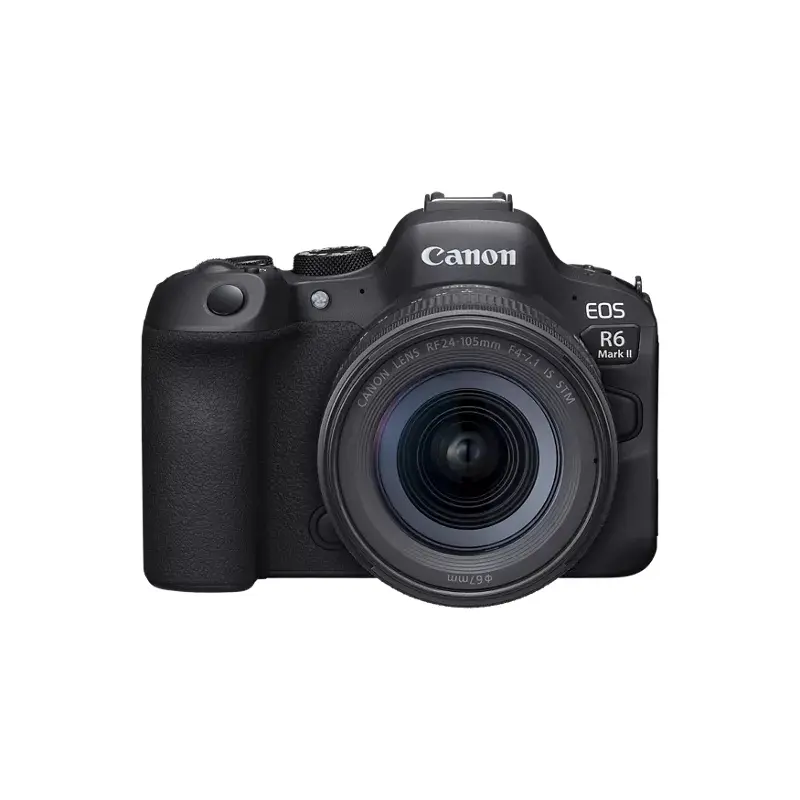
Sale! Canon EOS R6 Mark II Mirrorless Camera with 24-105mm f/4-7.1 IS STM
Canon EOS R6 Mark II Mirrorless Camera with 24-105mm f/4-7.1 IS STMCanon SKU: 5666C018 | Helix SKU: CA5666C018OverviewEOS R6 Mark II Full-Frame Mirrorless CameraIntroducing a standard full-frame camera evolved with hybrid features for still and movie shoot
$2,499.00
-
$147.00
 100% Happiness Backed or Your Money Back
- Spend 30, Ship Free
- Love It or Return It Within 60 Days
 100% Happiness Backed or Your Money Back
Details
Canon EOS R6 Mark II Mirrorless Camera with 24-105mm f/4-7.1 IS STM
Canon SKU: 5666C018 | Helix SKU: CA5666C018
Overview
EOS R6 Mark II Full-Frame Mirrorless Camera
Introducing a standard full-frame camera evolved with hybrid features for still and movie shooting. The EOS R6 Mark II enables various photographic expressions that transcend boundaries between recording personal life and professional production purposes, as well as between photo shooting and movie shooting. Achieve creativity in everyday life with the EOS R6 Mark II.
High Image Quality Featuring a New 24.2 Megapixel Full-Frame CMOS Sensor
The EOS R6 Mark II features improved resolution compared to its predecessor. A Canon-developed 35mm full-frame CMOS sensor with approx. 24.2 effective megapixels enables the camera to capture sharp and detailed images, even in low-light scenarios. Regardless of conditions whether day or night, indoor or outdoor dark portions of the image, even at high ISO speeds and increased sensitivity, are rendered with low noise.
DIGIC X Image Processor
A powerful DIGIC X Image Processor enables high-performance operation and coordination of processes such as Dual Pixel CMOS AF II, Image Stabilization, image processing, and video functionality. The DIGIC X Image Processor helps ensure your photos and videos look sharp and maintain high-resolution with minimal noise or grain.
High-Speed Continuous Shooting
For the first time among full-frame Canon EOS cameras, the EOS R6 Mark II introduces RAW Burst Mode1at up to 30 fps. By turning on RAW Burst Modes pre-shooting, shooting can start slightly before (about 0.5 seconds earlier) the shutter button is fully pressed. Coupled with high-speed continuous shooting at speeds of up to 12 fps with mechanical shutter, and up to 40 fps using electronic (silent) shutter, the camera can capture the split-second details between a subjects movements. This is great for dynamic action photos such as athletes, animals, and vehicles in motion or even capturing momentary changes in facial expressions for portraits.
Blazing Fast Autofocus
The highly responsive Dual Pixel CMOS AF II system covers up to approximately 100% x 100% of the picture area, breaking the image into up to 1,053 automatically-selected AF zones during Whole Area AF. The result is outstanding AF coverage, and the compositional freedom to focus sharply on a subject nearly anywhere in the frame.
Highly Accurate Subject Detection
Developed using Deep Learning Technology, horses, trains, and airplanes are newly detectable, in addition to conventional subjects like people, animals including dogs, cats and birds, and vehicles cars and motorcycles especially in a motorsports environment.2,3For more ease of use, Auto mode is now available, in which the camera automatically selects the type of subject without the need to switch the Subject Detection setting in the menu.
Head, Face, and Eye Detection
Even in situations where many cameras may struggle to detect a subject, the EOS R6 Mark II can locate and focus upon a persons head, face, or eye when the Subject Detection menu is set to People, allowing more ease of use, fast acquisition of your subject, and improvements to accuracy when capturing videos or still images. Additional control is now available for detecting the subjects left or right eye which can be also programmed to a Custom Button making it easy to focus on the preferred eye in the moment.
Animal Detection
The EOS R6 Mark II can effectively track the whole body, face, or eye of cats, dogs, birds, and now horses, for speed and precision regardless of the animals size, posture, or orientation of the face.2
Optimized for Video
With ample video recording features such as 6K oversampled uncropped 4K movie at up to 60 fps, Full-HD High-frame rate movie recording at up to 180 fps4, and AF tracking, the EOS R6 Mark II can meet the needs of hobbyists and experienced video content creators alike.
Continuous Movie Recording That Exceeds 30 Minutes
The EOS R6 Mark II can continuously record Full-HD video for up to 6 hours, allowing you to set up your video and keep your project rolling without worrying about it stopping.5Youll also be able to continuously record Full-HD 179.82p up to 60 minutes or more, and 4K 59.94p up to 50 minutes or more.
Features for Advanced Creators
Canon Log 3, HDR PQ, in-camera Full-HD proxy recording, and 6K 59.94p RAW data output to an external storage device6provides the image quality to support various production purposes.
Focus breathing correction (with compatible Canon RF lenses)7automatically compensates for changes in the angle of view caused by focus operations during movie recording.
Simultaneous recording of movies and stills to dual UHS-II SD card slots enables a backup to be created, so you can shoot with confidence.
In-body Image Stabilizer
Equipped with movie digital IS and 5-axis in-body IS, the EOS R6 Mark II enables smooth movie shooting with less camera-shake blur. With up to 8 stops of shake correction with Coordinated IS combining In-body Image Stabilization, and optical Image Stabilization in certain Canon RF lenses the camera makes handheld shooting easier at slower shutter speeds and in low-light situations.8To counter large, low-frequency camera movements, such as recording while walking, theres also electronic Movie Digital IS, which can be independently activated.
Vari-Angle Touchscreen LCD
Featuring a 3.0-inch, 1.62 million dot Clear View LCD II Vari-angle Touchscreen LCD, the EOS R6 Mark II makes it easy to compose and shoot from virtually any angle.
0.5-inch OLED EVF with Approx. 3.69 Million Dots
A high-precision 0.5-inch OLED (Organic Light-Emitting Diode) EVF with approx. 3.69 million dots and a 23mm eyepoint displays a bright image and extensive shooting information. The EOS R6 Mark IIs EVF supports up to a 120 fps refresh rate and has been designed to provide a bright, sharp and colorful 100% view of the subject at hand. Theres also an Optical Viewfinder (OVF) Simulation setting, which provides a higher dynamic range viewfinder image for superior viewing in harsh, contrasty lighting situations.
Wired and Wireless Communications
The EOS R6 Mark II supports both wired and wireless connections to your smartphone via its USB Type-C9port, built-in Wi-Fi, and Bluetooth technology, making it easy to upload and share movies and photos to your favorite social networks.
Built-in Bluetooth Capability
Bluetooth pairing helps you connect the camera to compatible smart devices using the free Canon Camera Connect app. This low-energy wireless connection helps preserve battery life, while providing remote control of the camera. It also sends continuously updated GPS location data from your phone, letting you geotag what you’ve captured so you know precisely where you captured the photo.
Built-in Wi-Fi Capability
Enable wireless functions, such as file viewing and transfer, by connecting to Wi-Fi quickly and seamlessly, and exchange data with other Wi-Fi compatible Canon cameras. Using the Canon Camera Connect app, you can also transfer files to your mobile device to browse and share on social media.
USB-C Connection
New to the EOS R6 Mark II is the ability to connect the camera to a computer or smartphone via USB-C.9All Canon Camera Connect app features that can be used with Wi-Fi are now available when the camera and smartphone are connected via USB, using a compatible cable for your device.
UVC Livestreaming
UVC/UAC compatibility allows the EOS R6 Mark II to be used as a web camera and stream live video in Full HD, without additional computer software, to applications such as Zoom, Microsoft Teams, Skype, and similar on-line meeting software.9Thanks to the full-frame CMOS sensor, youll be able to distribute clear live video images with low noise during remote conferences or livestreaming content.
Specifications
Specifications
Type
| Type | Digital interchangeable lens, mirrorless camera |
| Image Processor | DIGIC X |
| Recording Media | (Two) SD card slots
|
| Compatible Lenses | Canon RF lens group (including RF-S lenses) When using Mount Adapter EF-EOS R: Canon EF or EF-S lenses (excluding EF-M lenses) |
| Lens Mount | Canon RF Mount |
Image Sensor
| Type | Full-frame CMOS sensor (compatible with Dual Pixel CMOS AF) |
| Effective Pixels | Approx. 24.2 megapixels |
| Screen Size | Approx. 36.0 x 24.0 mm |
| Pixel Unit | Approx. 6.00 m square |
| Total Pixels | Approx. 25.6 megapixels |
| Aspect Ratio | 3:2 (Horizontal:Vertical) |
| Color Filter System | RGB primary color filters |
| Low Pass Filter | Installed in front of the image sensor, non-detachable |
| Dust Deletion Feature |
|
Recording System
| Recording Format | Compliant to Design rule for Camera File system 2.0 and Exif 2.31*. *Supports time difference information in Exif 2.31. |
| Image Format | JPEG, HEIF, RAW / C-RAW / Dual Pixel RAW/ RAW burst (CR3), C-RAW (Canon original) ; Movies: ALL-I (Time-lapse video only), IPB (MP4) |
| File Size | * At H+ Drive setting (12 fps), using Mechanical or 1st-curtain Electronic shutter. *1: Number of shots using a 32 GB card that conforms to Canon testing standards. *2: Number of shots using a 32 GB UHS-II card that conforms to Canon testing standards. *3: When set to [HDR shooting (HDR PQ): Disable]. *4: When set to [HDR shooting (HDR PQ): Enable]. |
| File Numbering | The following file numbers can be set:
|
| RAW + JPEG / HEIF Simultaneous Recording | Simultaneous recording of any combination of RAW/C-RAW and JPEG/HEIF image-recording quality is supported. |
| Color Space | Selectable between sRGB and Adobe RGB |
| Picture Style |
|
White Balance
| Settings |
*1: Effective also in twilight and sunset. |
| Auto White Balance | Option between ambience priority and white priority settings, using SET button |
| White Balance Shift | Blue/amber bias: 9 levelsMagenta/green bias: 9 levelsCorrected in reference to the current WB modes color temperature. |
Viewfinder
| Type | OLED color electronic viewfinder; 0.5-inch, approx. 3.69 million dots |
| Coverage | Approx. 100% vertically and horizontally relative to the shooting image area (with image quality L, at approx. 23mm eyepoint). |
| Magnification / Angle of View | Approx. 0.76x / Approx. 35.2 degrees (with 50mm lens at infinity, -1 m-1) |
| Eye Point | Approx. 23mm (at -1 m-1from the eyepiece lens end) |
| Dioptric Adjustment Range | Approx. -4.0 to + 2.0 m-1(dpt) |
| Viewfinder Information |
|
Autofocus
| Focus Method | Dual Pixel CMOS AF |
| Number of AF zones available for Automatic Selection | AF area: Horizontal: Approx. 100% x Vertical: Approx. 100% (100% x 100% AF coverage in Face Detect + Tracking AF; coverage can vary, depending upon lens being used) Stills: Max. 1053 zones (39 x 27) Movies: Max. 1053 zones (39 x27) |
| Selectable Positions for AF Point | AF area: Horizontal: Approx. 90% x Vertical: Approx. 100% Stills: Max. 4897 positions (83 x 59) Movies: Max 4067 positions (83 x 49) |
| AF Working Range | EV -6.5 to 20 (f/1.2 lens*, center AF point, One-Shot AF,at 73F/23C, ISO 100 * Except RF lenses with a Defocus Smoothing (DS) coating. |
| Focusing brightness range (still photo shooting) | EV 6.5 to 21 (with an f/1.2 lens,* center AF point, One-Shot AF at room temperature, and ISO 100) * Except RF lenses with a Defocus Smoothing (DS) coating. |
| Focusing brightness range (in movie recording) | 4K: EV 4.0 to 21 Full HD: EV 4.5 to 21 (with an f/1.2 lens,* center AF point, One-Shot AF at room temperature, ISO 100, and 29.97 / 25.00 fps.) * Except RF lenses with a Defocus Smoothing (DS) coating. |
| Available AF Areas |
|
| Available Subject Detection |
|
| Eye Detection | Auto:
Manual:
|
Exposure Control
| Metering Modes | Real-time metering from CMOS image sensor (384 [24×16] metering zones)
|
| Metering Range | EV -3 – 20 (at 73F/23C, ISO 100)(Still Photo Shooting) |
| Exposure Modes |
|
| ISO Speed Range | Manually Set
ISO Auto range settings in still photo shooting *1: ISO 200 when set to [Highlight tone priority: Enable/Enhanced]. |
| Exposure Compensation | Click here to view the full specifications PDF. |
| AE Lock |
|
Shutter
| Type | Electronically controlled focal-plane shutter
* Cannot be used in conjunction with the following functions: flash photography, HDR shooting, multiple exposures, Multi Shot Noise Reduction, AEB, HDR PQ, anti-flicker shooting, Dual Pixel RAW shooting, Digital Lens Optimizer [High]. * A shutter release sound is not generated. However, note that the sounds other than the shutter release sound (aperture, focusing lens drive sound/electronic sound, etc.) may be generated. * In electronic shutter shooting under conditions such as flash firing by other cameras or with fluorescent lighting or other flickering light sources, a strip of light or banding due to the brightness difference may be recorded in the image. |
| Shutter Speeds | Mechanical / 1st-curtain Electronic shutter: 1/8000th sec 30 seconds, in 1/3 or 12-step increments Electronic shutter: 1/8000th sec 30 seconds, in 1/3 or 12-step increments (1/16,000th possible, if user-set in Tv or M shooting modes) |
| X-sync Speed | Mechanical Shutter: 1/200 sec. Elec. 1st-curtain: 1/250 sec. |
| Shutter Release | Soft-touch electromagnetic release |
| Self Timer | 10-sec. delay, 2-sec. delay |
Image Stabilization
| Still Photo IS | In-body IS operation can be selected when using a non-IS lens.
|
External Speedlite
| Accessory Shoe | Canon Multi-function accessory shoe Optional Canon AD-E1 adapter required for conventional shoe-mount flashes and accessories |
| E-TTL Balance | Ambience priority, standard, flash priority |
| Flash Exposure Compensation | 3 stops in 1/3- or 1/2-stop increments |
| Continuous flash control | E-TTL each shot / E-TTL 1st shot |
Drive System
| Drive Modes and Continuous Shooting Speed | Click here to view the full specifications PDF. |
HDR Shooting
| HDR Shooting (HDR PQ) | Disable / Enable |
| Still Photo HDR PQ | Click here to view the full specifications PDF. |
| Movie HDR PQ | Click here to view the full specifications PDF. |
| Continuous HDR Shooting (still images) | 1 shot only / Every shot |
Video Shooting
| Shooting Times | Click here to view the full specifications PDF.*1Time available for continuous shooting in 23C / 73F environment, from a cold start. If the camera is in LV mode standby before shooting or the ambient temperature is high, the shooting time may be shorter.*2According to Canon measurement conditions when using UHS-II cards conforming to Canon testing standards.*3The maximum duration of shooting may be shorter under some circumstances even if recording begins from “cold start,” due to a rise in temperature inside the camera caused by pre-shooting camera setting operations or by prolonged use of the Live View mode. When the card is full, movie recording stops automatically. In this case, duration time when you erase the data and restart shooting. |
| File Format | Normal MoviesClick here to view the full specifications PDF. * Recording in AAC when [Audio compression] (C.Fn4) is set to [Enable] or Linear PCM when set to [Disable]. |
| Estimated Recording time, Movie Bit Rate and File Size | H.264/AVC (Canon Log: Off, HDR PQ: Off) Click here to view the full specifications PDF. * Bit rate only applies to video output, not audio or metadata. * Audio is recorded when [C.Fn4 audio compression:Enable] (Audio: AAC) is set. * Movie recording stops when the maximum recording time per movie is reached. * No audio is recorded for approx. the last two frames with the compression method for movie recording quality set to IPB (Standard) or IPB (Light) and the camera set to [C.Fn4 Audio compression: Enable]. Moreover, the video and sound may be slightly out of sync when movies are played back in Windows. * Mbps megabits per second (8 megabits = 1 megabyte) |
Shipping Info
- Cost: $25
- Free Shipping
- We offer free shipping on orders over $30. Please check the free - shipping eligibility at checkout.
- Delivery Time:
- It usually takes [3-5] business days for standard shipping. Please note that this is an estimated time frame and may be affected by local holidays, and unforeseen circumstances.
Related products
Reviews
There are no reviews yet.